
Conversation retention
Choose how long your workspace keeps what customers said, and know what stays after it's gone.
You need the Manager role to change this. Anyone in the workspace can see it.
Retention sets how long your workspace keeps transcripts and personal details from calls and chats. After that period, the content is removed. Outcomes, topics and analytics stay, so your trends don't disappear with the transcripts. The setting covers the whole workspace.
A clinic that handles sensitive enquiries might choose a short period so patient details don't linger. A hotel that wants to review disputes from last season might choose a longer one. Your plan sets the longest you can pick.
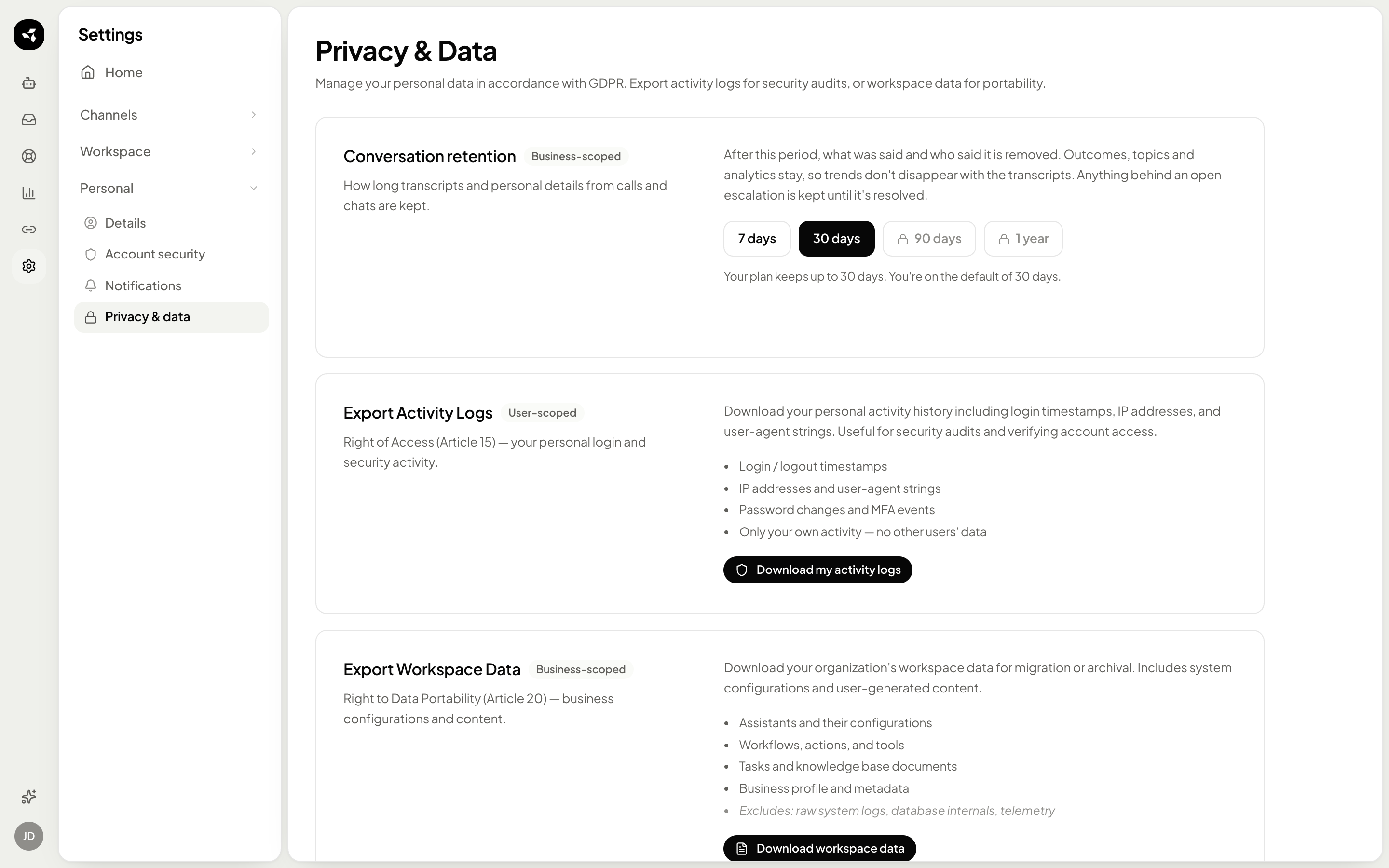
Choose a retention period
- Go to SettingsPersonalPrivacy & data.
- Find the Conversation retention card.
- Choose 7 days, 30 days, 90 days or 1 year.
The default is 30 days. Longer periods your plan doesn't include show a lock and can't be picked. The line under the buttons says how long your plan keeps, for example "Your plan keeps up to 90 days", and whether you are on the default. See Billing to change plans.
A longer period saves straight away. A shorter one asks you to confirm first, with a Shorten to button that names the new period.
Shorten the period
- Go to SettingsPersonalPrivacy & data.
- On the Conversation retention card, choose a shorter period.
- Read the confirmation, then choose Shorten to and the period.
Transcripts and personal details older than the new period are removed at the next clean-up, and you can't get them back by choosing a longer period later. Make sure you have what you need first. Outcomes, topics and analytics are kept.
What's removed and what's kept
After the retention period, these are removed: chat messages and call transcripts, phone numbers and contact names, and the link to each call recording. Summaries, what the customer wanted, next steps and key moments go too, along with the details the agent collected, playbook notes, the markers in each thread, and the details collected for resolved escalations.
These are kept: the outcome and topic of each conversation, call status, duration and cost, analytics and topic counts, and escalation records, without the customer's details.
Anything behind an open or claimed escalation is kept until the escalation is resolved. Resolve escalations promptly to let retention do its job (see Work escalations).
What you see in the Inbox
- Chat messages older than the period are gone from the thread. If the contact wrote again since, the newer messages stay.
- A call whose transcript was removed stays in the Inbox list. Opening it says what was said was removed, and when. Its outcome and topic are kept.
- An earlier visit under Recent conversations reads "The details of this conversation were removed on (date), after your workspace's retention period. Its outcome and topic are kept."
Analytics still counts these conversations (see Analytics overview).
FAQs
Who can change retention?
Only a Manager. Other roles can see the setting but not change it.
Why is a longer period locked?
Your plan doesn't include it. The line under the buttons says the longest your plan keeps.
Can I get conversations back after shortening?
No. Choosing a longer period later doesn't bring removed content back.
Will my analytics change?
No. Outcomes, topics and analytics stay after the content is removed.
Why is an old conversation still there?
It is probably behind an open or claimed escalation. It is kept until the escalation is resolved.
Related
Questions about your data? Email support@trycareflow.com.