
Copilot overview
Copilot is a chat panel in the dashboard where you ask about your workspace or describe what you want built, and approve each change it proposes.
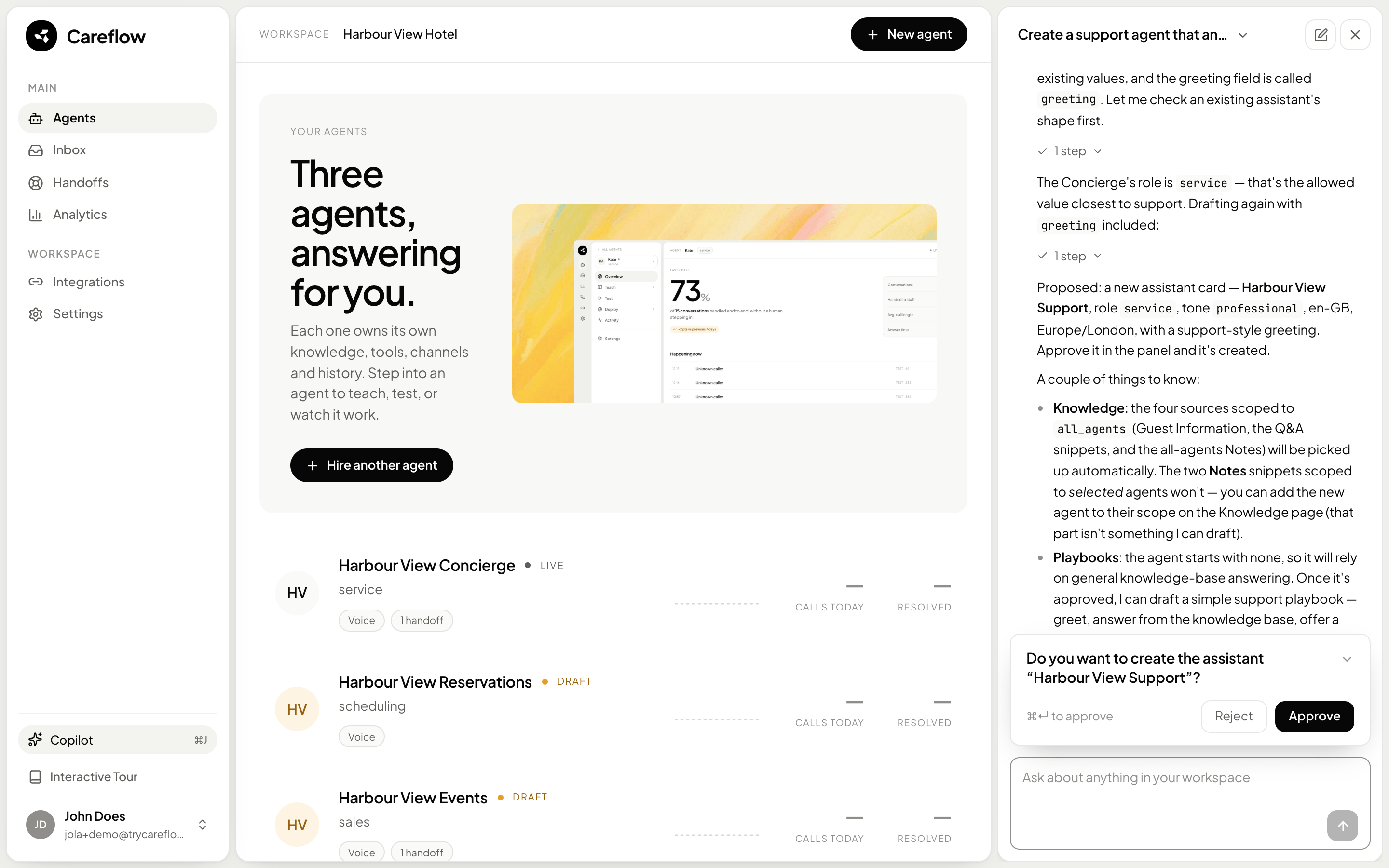
Copilot answers questions about your workspace and builds things for you from a plain description. It looks things up, takes you to the right page, and proposes changes as cards. Nothing changes until you approve a card.
Picture a hotel manager setting up a front desk agent. Instead of filling in forms, she opens Copilot and types "a receptionist that answers questions about rooms and breakfast, and hands complaints to a person." Copilot drafts the agent, then a playbook and a handoff routine to go with it, and she reviews each one before it exists.
Copilot reads and changes only what your role allows (see Roles and permissions). When you approve a card, the change is made under your account, exactly as if you had made it in the dashboard.
What you can do
Ask about your workspace
Ask Copilot about agents, playbooks, handoff routines, knowledge, tools, workflows, numbers and your team. It looks up the answer and, where useful, takes you to the page that shows it. It knows which page you are on, so "this agent" or "this playbook" means the one in front of you.
Build by describing
Describe what you want in your own words and Copilot proposes it. On Agents, New agent opens Copilot on a new conversation. On an agent's Playbooks tab, Build with AI does the same for a playbook. See Build an agent with Copilot and Build a playbook with Copilot.
Review every change
Each proposal is a card that says what it would do and lists anything that would stop it from working. You choose Approve to make the change, or Reject to turn it down. After each approval Copilot carries on with the next piece, so a new agent is usually followed by its playbook and a handoff routine, each attached to the agent it just made.
Stay in control of what goes live
A playbook Copilot writes is saved as a draft version. Nothing reaches live conversations until you publish it. A new tool Copilot drafts starts as a draft too, and no agent uses it until it passes a test in the tool editor. See Publish and versions.
What Copilot can and can't change
Copilot proposes changes to agents, playbooks, handoff routines, variables and tools. It never drafts credentials for a tool. You add those yourself in the tool editor.
It reads knowledge sources, integrations, workflows, phone numbers and your team, and tells you which page to use to change them.
Open Copilot
Press ⌘J (Ctrl+J on Windows) anywhere in the dashboard, or choose Copilot in the sidebar. Copilot appears only when it is turned on for your workspace. If you don't see it, the other ways of building an agent work exactly the same. See Create an agent.