
Test what your agent finds
Run a test search to see the passages an agent would pull in, before your customers ask.
When an agent answers oddly, start with retrieval: did it find the right content? A test search runs the same lookup your agents run and shows the matching chunks, best match first. No conversation is needed.
You need at least one Live source.
Search across everything
- Open Knowledge in the main sidebar.
- Select Test search.
- Type the question a customer would realistically ask, for example "How early should new patients arrive?"
- Select Search, or press Enter.
- Review the chunks. Each one shows the document it came from, its chunk number, and how close the match is.
This searches every document in the workspace, whichever agents use it. It is the fastest way to confirm a fact exists in your knowledge at all. If nothing is close, it says "Nothing in your knowledge is close to that question."
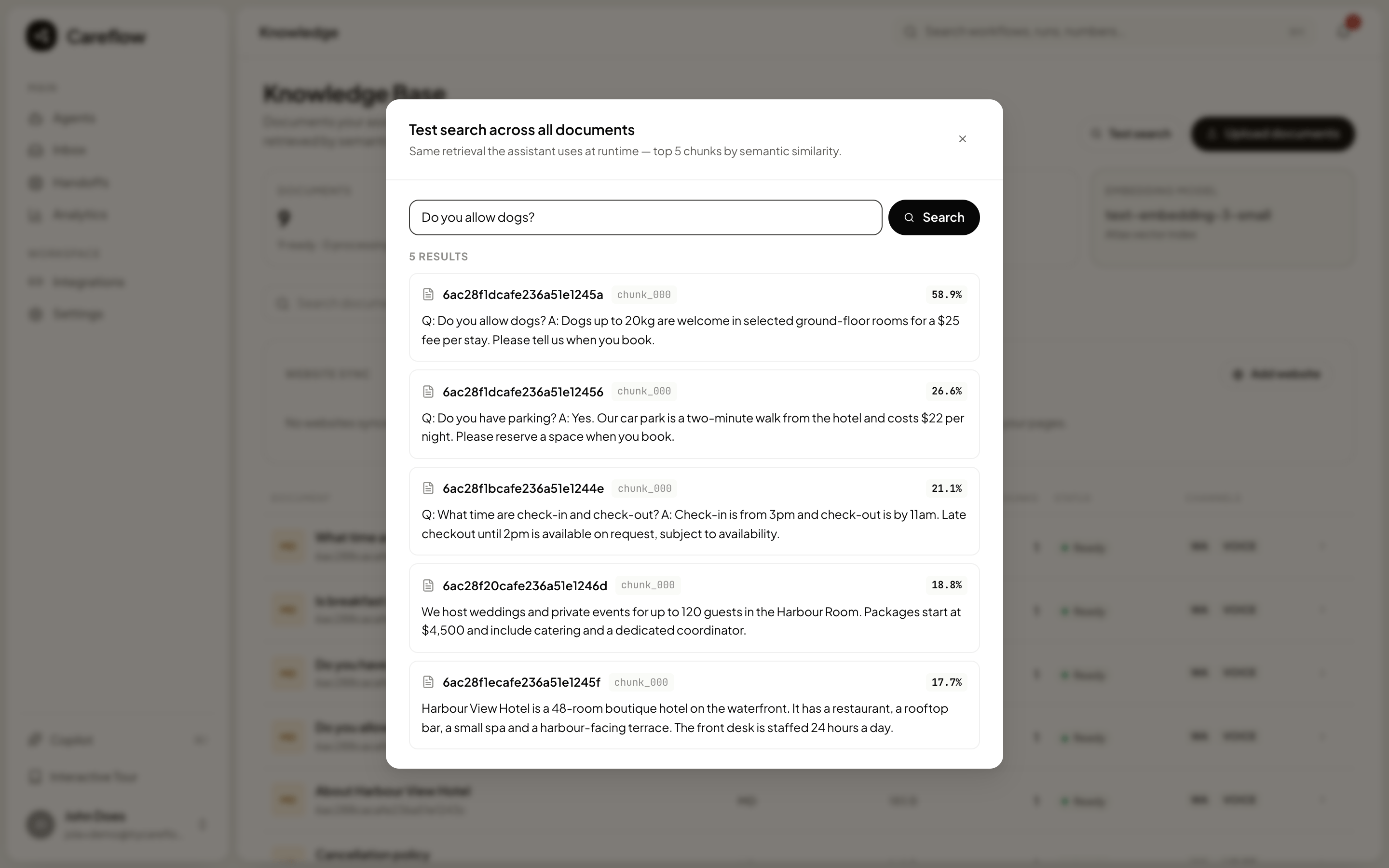
Write the question the way a guest would say it. A hotel might try "Can I check in early?" rather than the heading of its policy page, because customers rarely use your wording.
Search within one document
- Open the document: select an uploaded file's row, or expand a website sync and select a page.
- Open the Search test tab.
- Enter a customer-style question and select Search.
- Review the matching chunks from that document only.
This works from TeachKnowledge and from the workspace page. Use it when you know which document should hold the answer and want to see how it reads to the search.
When to run a test search
Run one after any change, so you see the effect before a customer does.
- After you add a document, Q&A, note or website sync and it turns Live.
- After you edit an entry or run Sync now on a website.
- Whenever an answer sounds wrong, before you touch the playbook or the wording.
The fix is usually better content, not a better prompt.
Read the results
- Strong, sensible matches: retrieval works. Look at the playbook or wording instead, and test the conversation, see Test in chat.
- No matches: there is nothing to answer from. Add content, see Add documents, Q&As and notes.
- Weak, fragmented matches: the content is hard to find with customer phrasing. Rewrite the entry or check the preview, see Keep knowledge up to date.
The workspace test search covers every document. An agent only searches the sources it can use. Check the source's Sharing or Agents column, see Share knowledge across agents.
FAQs
Does a test search cost me a customer conversation?
No. It shows matching chunks without a customer message.
Why do I see "Nothing in your knowledge is close to that question"?
No passage matched. Add the missing content, or reword an entry closer to how customers ask.
Can I test one agent's access?
The workspace search covers every document. To check an agent, look at the source's sharing and then test the conversation.