
Try a playbook draft
Test a playbook while you write it, with real lookups and no real changes.
The playbook editor has its own preview. It runs your draft, so you can test a half-finished playbook as freely as a finished one. You don't need to publish first.
Try the playbook
- Open the playbook in the editor.
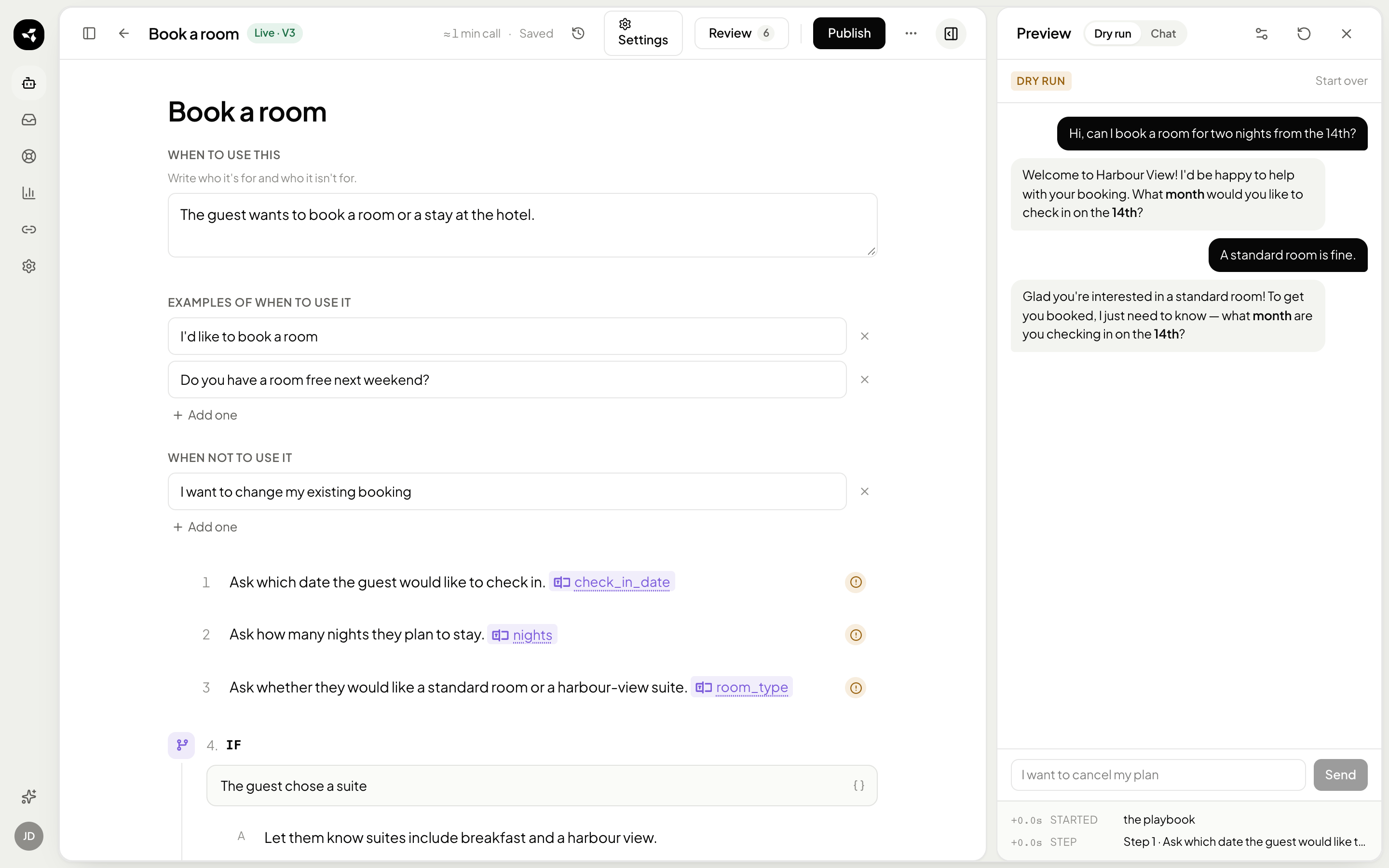
- Choose the panel icon at the right of the editor bar (Try this playbook). The Preview panel opens on Dry run.
- Type what a customer would say and choose Send.
- Choose Start over for a fresh conversation.
The preview runs the whole agent, so say something that should start this playbook. If you're writing a hotel playbook for late check-out, type "Can I check out at 2pm tomorrow?" rather than a generic greeting.
Read the reply. When the agent calls a tool, the tool's name appears under the reply. Then follow the trace under the chat: which step ran, what was collected, and where the conversation went. See Troubleshoot playbooks with traces.
Pick a mode
- In the Preview panel, use the switch at the top.
- Choose Dry run to see the chat with the trace under it.
- Choose Chat to see the chat the way a customer sees it.
Both modes run your drafts. Dry run is the default in the editor, and it suits step-by-step testing of this playbook. Chat has no trace, so use it to check how the replies read.
Your edits restart the dry run
The editor saves as you type. Each time it saves, the dry run starts over, so no turn runs against work you've since changed. The panel then reads "The next thing you say starts a fresh conversation."
This means you can edit a step, then send the same message again to see the change. You don't need to press Start over yourself after an edit.
Lookups run for real, so the conversation goes the way it would with a customer. Anything that would change something is held back, and the agent reports what it would have done. Handoffs are off, so no one is notified. If a step skips a booking or an escalation, that is the dry run doing its job.
What the preview uses
The preview uses the agent's saved persona and settings. Those have no draft, so they're the same ones customers get. Your playbook is the only part that runs as a draft.
Hear the playbook on a call
A voice test call runs your published playbooks, not your draft. Publish first, then call. See Make a test call.
In Chat mode, the phone icon next to the message box starts a voice test call. That call uses your published playbooks, runs writes for real. Its handoffs are never real: the line is spoken, but nothing is queued or notified.
FAQs
Do I need to publish the playbook to preview it?
No. The preview runs your draft as you write.
Why did my conversation reset?
The editor saved, and every save restarts the dry run. Send your message again.
Why didn't the agent book anything?
Writes are held back in a preview. The agent reports what it would have done.
Does the preview use my unsaved persona changes?
No. It uses the persona and settings you last saved.