
Playbooks overview
A playbook is a procedure you write in plain sentences, and your agent follows it step by step.
A playbook is a procedure with a goal: cancel a booking, check in a guest, book a clinic appointment, process a return. You write the steps the way you would brief a new colleague. When a customer asks for that thing, the agent starts the playbook and works through it, asking questions, looking things up and taking action along the way.
You find playbooks in the agent console under Teach, then Playbooks. A playbook belongs to the agent you create it from.
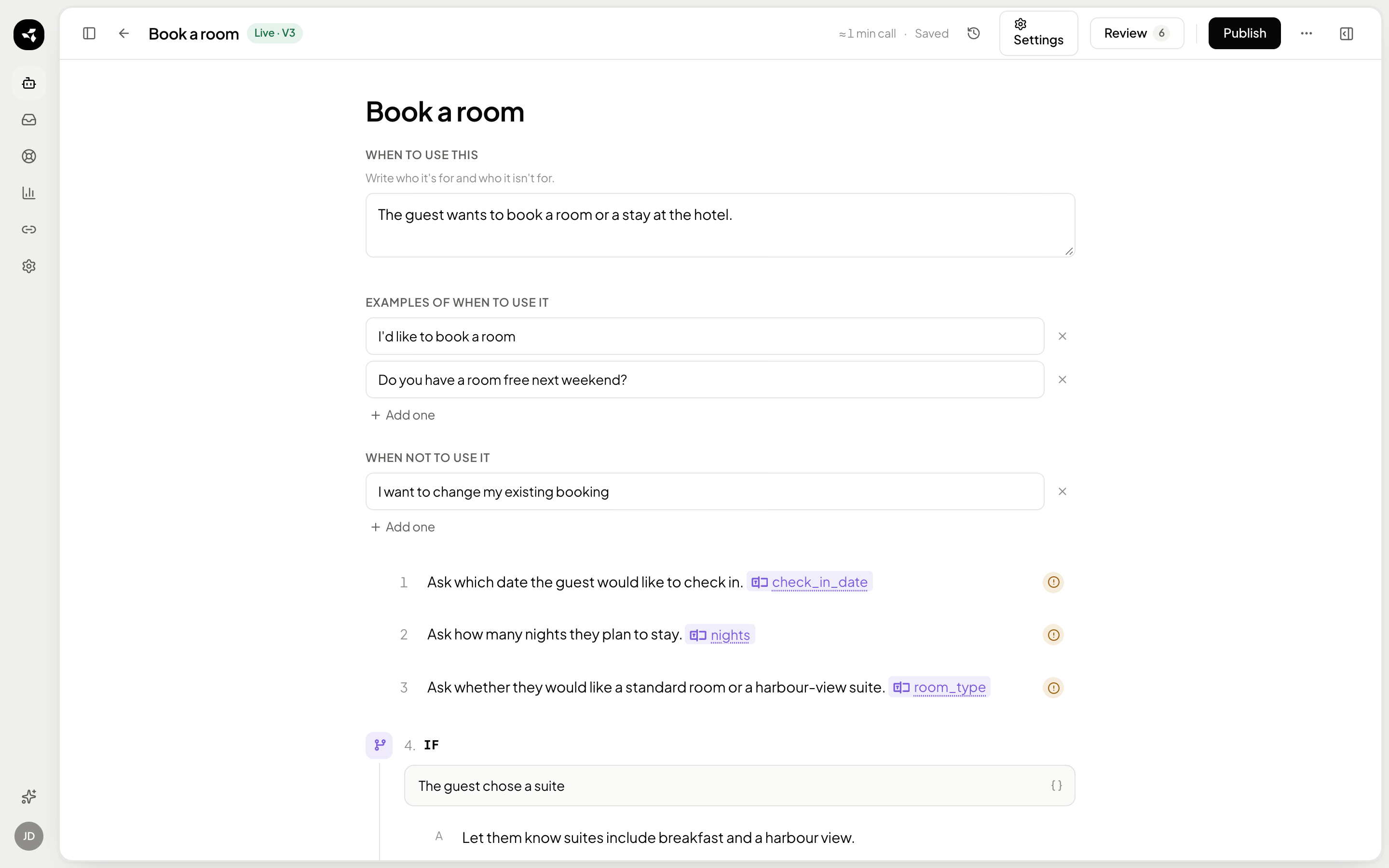
What a playbook is made of
Every playbook has three parts: a header, a list of steps, and a few settings. Knowing which part does what makes the editor easy to read.
The header tells the agent when the playbook applies. When to use this is a sentence saying who the playbook is for and who it isn't for. The agent reads it to decide whether to start the playbook, and a playbook can't publish without it. Examples of when to use it are things a customer might say, like "I need to cancel my booking". When not to use it holds things that sound close but belong elsewhere, like "I want to change my room".
The steps are numbered sentences saying what to ask, what to check and what to do. Inside a step you type @ to add something the agent does there: call a tool, collect a value, say a line word for word, hand off to a team, or end the playbook.
Settings holds Guidance for the whole playbook, an End message, and whether the agent may switch to another playbook.
Write steps in plain language
Steps are sentences, not code. One job per step keeps the playbook easy to review and the agent reliable. Specific steps make the agent do what you meant. Vague steps make it improvise. See Write steps.
Reach into your systems with mentions
Typing @ opens the mentions menu. You can pick a tool so the agent calls it at that step, ask the agent to collect a value such as an email, make it say a line exactly, or hand the conversation to a team. Mentions are how a playbook acts rather than just talks. See Use mentions.
Branch with conditions
Real conversations split. A lookup finds the booking, or it doesn't. The guest is happy, or upset. An IF block holds its own steps and can have an ELSE. You can write the test in words, such as "the customer is upset", or as an exact rule on a value. See Add conditions.
Finish cleanly
A playbook can end with a closing line said word for word, and on calls it can hang up afterwards. If you don't set one, the agent sums up and asks whether there's anything else it can help with. See End a playbook.
Edit safely, publish when ready
You always edit a draft. Customers always get the published version. Publishing freezes the draft as a new numbered version, and a conversation keeps the version it started on, even if you publish again mid-call. You can try the draft in Dry run first, and the history lets you compare versions and bring an old one back. See Publish and versions.
When a playbook is the right choice
Use a playbook when the task has steps in order, when the agent must do something like look up, book, cancel or update, or when the path branches. If a question has one answer, put it in Knowledge. If a person must decide now, use a handoff. The comparison page covers the choice in detail: Playbooks, knowledge or tools?.
Anyone on your team can create, edit, publish and restore playbooks, and every publish is recorded in the playbook's history. See Roles and permissions.
Get started
- Write your first playbook: a worked example from a blank page to published.
- Build a playbook with Copilot: have Copilot draft the first version for you.