
Variables and sensitive values
Declare a value once, like your support hours or an API key, and use it in tools, playbooks and messages.
A variable is a named value your agents can use anywhere: your clinic's timezone, a support email, a booking link, or a credential for your own system. Change it in one place and every tool and playbook that uses it picks up the new value on its next use.
Members and Managers can both create, edit and delete variables. Variables live in SettingsWorkspaceVariables.
Create a variable
- Go to SettingsWorkspaceVariables and choose New variable.
- Under Key, type a lowercase name like
clinic.timezone. Dots group related values. - Choose a Scope, a Value type, and add a Description of what it's for.
- Choose Static value and type the Value, or choose Computed and fill in Computed from.
- Choose Create variable.
To edit a variable, choose its row, change it and choose Save changes. You can't change a key once it's created. To delete one, use the bin icon on its row. Anything that still uses it stops getting a value, so check your tools and playbooks first.
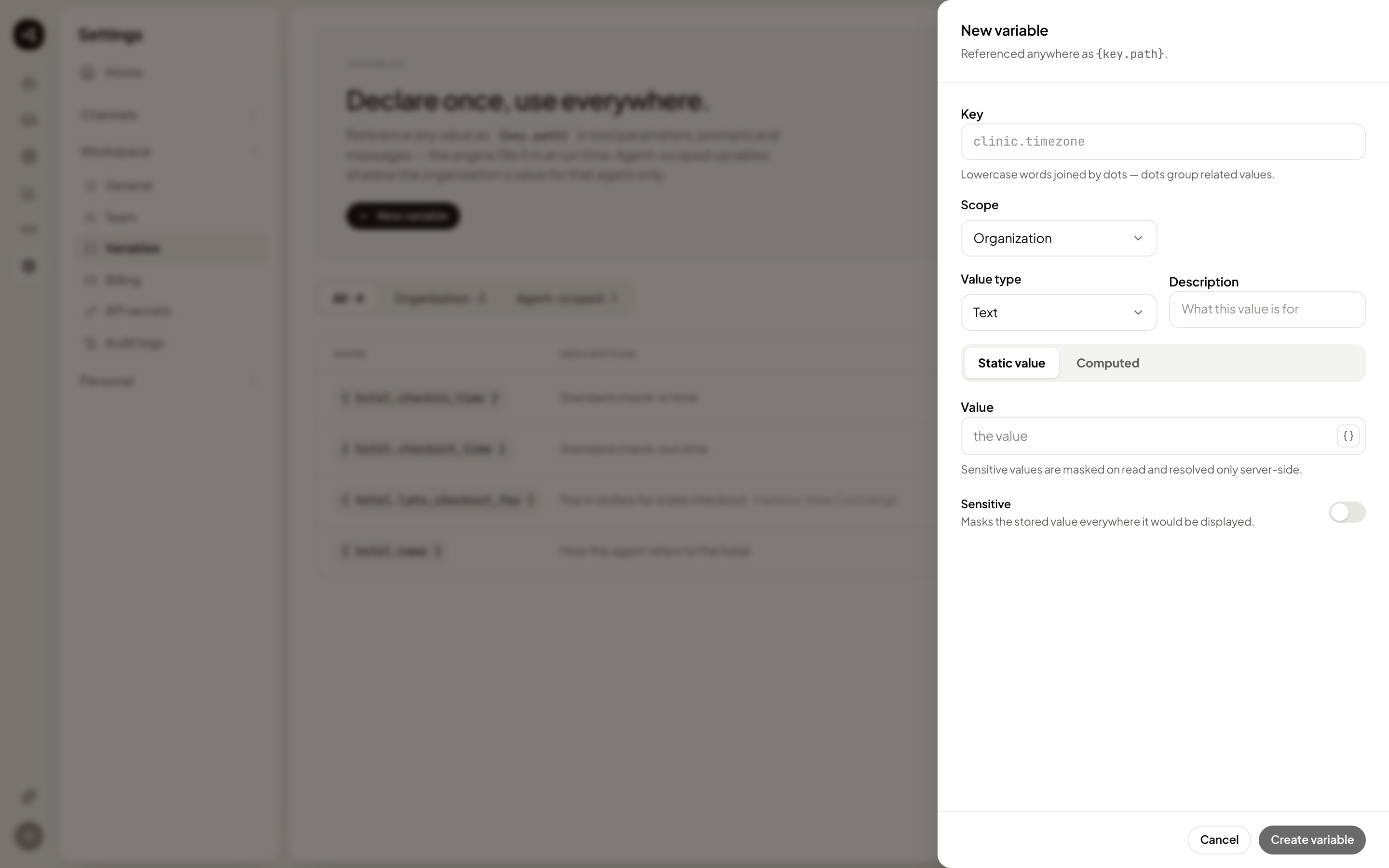
Scope
Choose Organization for every agent, or Agent and then pick the agent. An organization variable has one value across every agent and shows Org in the list. An agent variable is a value for one agent only, and shows Agent. If it has the same key as an organization variable, that agent uses its own value.
Use agent scope when the same playbook should behave differently per agent, like a different booking link for each branch of a hotel group. Filter the list with All, Organization or Agent-scoped, or search by key or description.
Value types
Text holds something like support@yourclinic.com, Whole number 30, and Number 4.5. True / false holds true, Date 2026-12-24, and Money 25.00. Choice list needs Allowed values, comma-separated, like standard, priority, enterprise.
Static or computed
A Static value is typed in once. A Computed value is built from other variables and plain text, like {clinic.name} support hours {clinic.hours}. When a value contains braces, the drawer shows what it Resolves to right now, and flags any key it doesn't know.
Use a variable
- Write the key in braces, like
{clinic.timezone}. - In any field that takes variables, type
{to pick one from a list. If the one you need doesn't exist yet, create it from the same list.
In an API tool, use it in the URL, query parameters or body as {clinic.timezone}. In a header value, type {acme.api_key}. An input's Custom value takes {clinic.timezone} too. See Create an API tool. In playbook text, like a closing line, write {clinic.timezone}. In an exact-rule condition in a playbook, write vars.clinic.timezone. See Add conditions.
Some values are always there, under System: {env.now}, {env.today_start}, {env.today_end}, {env.date} and {env.time}. They use UTC. Keys can't start with env. or case..
Protect a sensitive value
- When you create or edit the variable, turn on Sensitive.
- Add Allowed domains, like
api.example.com, or*.example.comfor any subdomain.
Turn on Sensitive for a credential or personal data. The value is masked everywhere it would be shown, including to you, so to change it you type a new one. To turn Sensitive off again, you have to type the value in again.
Allowed domains lists where the value may be sent. A tool call that carries the value to any other host fails with Couldn't run. With no allowed domains, the value can't be sent anywhere.
Anyone can create a sensitive variable or change its value, but only a Manager can add or change its Allowed domains. If you're a Member, ask a Manager to add the domain before any tool can use the value.
FAQs
Can I rename a variable's key?
No. A key can't be changed once it's created. Create a new variable and update what uses the old one.
Which value wins when an agent and the organization both set a key?
The agent's own value.
Why did my tool fail with Couldn't run after I used a sensitive variable?
The value is only sent to its Allowed domains. Check that the tool's host is listed.
Are the System values in my timezone?
No. {env.now} and the other System values use UTC.